

How to split one shoot's invoice between co-listing agents
By Omnivou Team · Published · 6 min read
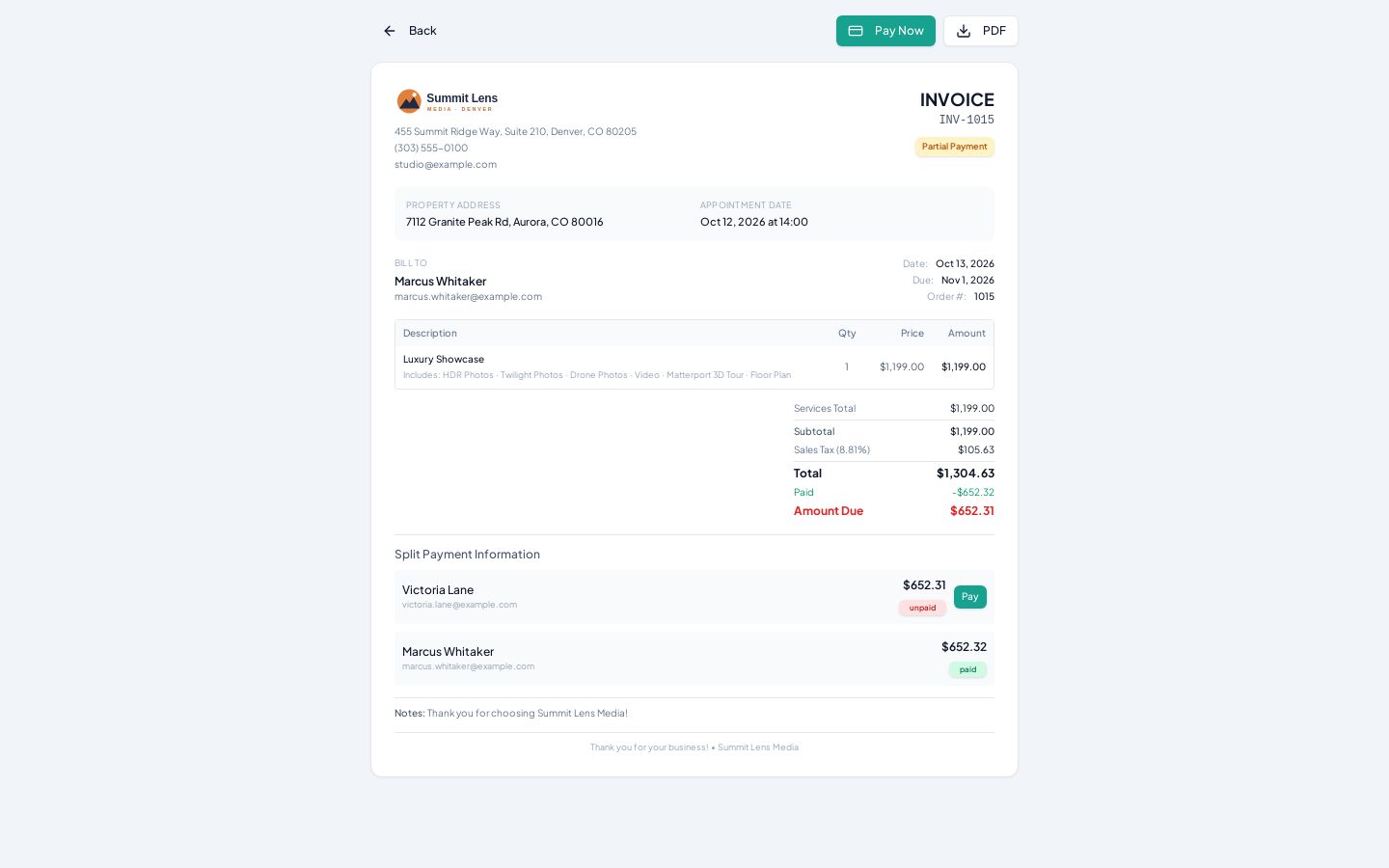
To bill two co-listing agents for one shoot, agree the split before the shoot, keep the job as one order, and give each agent their own share with their own payment link, receipt and reminders. Each agent then pays on their own schedule, and you can see at a glance which half is still open instead of waiting for two people to settle it between themselves.
This guide covers the ways studios bill a shared listing, what to agree up front, what each invoice should show for GST/HST, and how to collect both shares. It is general information, not tax or legal advice.
Why co-listed shoots cause billing trouble
A co-listed property has one address, one shoot and one set of photos, but two clients. Only one of them may book. The other may be at a different brokerage, may not have seen your price list, and may expect their partner to cover the cost. The usual problems:
- The booking agent assumes the other agent will pay half, and the other agent has not agreed to it.
- One agent pays their share and the rest sits open, with nobody clearly responsible for it.
- Both agents want a receipt in their own name for their own records.
- Add-ons ordered after the shoot, such as a twilight edit, get billed to whoever happens to ask for them.
None of this is hard to solve. It just has to be decided before the shoot, not after the invoice goes out.
Four ways to bill a shared listing
| Method | How it works | Works when | Watch out for |
|---|---|---|---|
| One invoice to the booking agent | The agent who booked pays in full and recovers the other half from their partner. | The agents already share costs this way. | You are paid only when one person pays the whole amount. |
| Two separate invoices | You create a second invoice by hand for the other agent's share. | Co-listings are rare for you. | Two records for one job; easy to lose track of which half is unpaid. |
| One invoice with a payment schedule | A deposit and milestone payments on one invoice. | One client pays in stages. | All payments go to the same customer, so it does not split between payers. |
| One order, split between payers | One job, with each payer's share billed and tracked separately. | You shoot co-listings regularly. | Needs software that supports split payers, and an agreed split. |
A payment schedule is often mistaken for a split invoice. Square's help centre, for example, describes payment schedules as a way to take a deposit and split the remaining balance into up to 12 milestone payments, all on one invoice to one customer (Square: scheduling multiple payments on a single invoice, as of November 2026). That controls when a client pays, not who pays.
Agree the split before the shoot
A split that was never agreed in writing is hard to enforce later. Settle these points at booking, ideally in the booking form itself, and repeat them in the confirmation email:
- Who the payers are. Name and email for each agent, or the brokerage if it pays.
- How the cost is divided. Half each, a fixed amount each, or one agent pays the package and the other pays the add-ons.
- Who pays for later add-ons. A twilight conversion or virtual staging ordered after delivery is simplest to bill to the agent who orders it. Say so up front.
- Who pays tax and travel fees. Split them with the rest of the invoice, or assign them to the booking agent.
- What happens if one share is unpaid. Decide whether downloads open when the whole job is paid or when one share is paid (more on this below).
Capturing the co-listing agent at booking saves an email later. Omnivou's booking flows include a co-listing agent field next to the address, property details and access instructions.
What each agent's invoice should show
Agents who are GST/HST registrants may want to claim input tax credits on your fee, and the Canada Revenue Agency's rules set what the supporting invoice must contain. Under section 3 of the Input Tax Credit Information (GST/HST) Regulations, the required details grow with the amount:
| Amount of the supply | Information required |
|---|---|
| Under $100 | Your business name, the invoice date and the total amount |
| $100 to $499.99 | The above, plus your GST/HST registration number and the tax charged (or a statement of which amounts include tax) |
| $500 or more | The above, plus the recipient's name, the terms of payment and a description of the supply |
The simplest approach is to put all of it on every invoice regardless of amount: each payer's own name, your registration number, the tax, a description such as "Listing photography, 123 Main St, 50% share" and your payment terms. It costs nothing and means neither agent has to ask for a corrected copy. In the United States, sales tax on photography services depends on the state, so check the rules where you work.
Collecting from two payers
Once the split is agreed, each payer should be treated as a separate client for collection purposes:
- Their own payment link. One agent paying should never depend on the other opening the same email.
- Their own status. You should see that the listing agent has paid and the co-listing agent has not, without opening a spreadsheet.
- Their own reminders. Reminders before the due date, on the day and after it go only to the payer who still owes.
- Their own receipt. Each agent gets proof of payment in their own name.
When to release the downloads
If you lock downloads until payment, a split invoice raises a choice. Releasing them only when both shares are paid protects you best, but the agent who paid on time is left waiting for their partner. Releasing them when the booking agent's share is paid keeps the listing on schedule and leaves you collecting the second share after delivery. You can also decide per client: full payment for new agents, the booking agent's share for regular clients. Whichever you choose, write it into the terms you send at booking. Our guide to getting paid before you deliver covers locked downloads and payment terms in more detail.
Add-ons and changes after the shoot
Co-listed jobs can grow after delivery: one agent wants a twilight edit, the other wants a reel for social media. Bill each add-on to the agent who orders it, unless both agree to share it. If your delivery page sells add-ons directly, the agent who clicks pays, which settles the question without a conversation.
Reschedules and cancellations need a rule too. If the shoot is cancelled after the cut-off, the simplest rule is to split the cancellation fee the same way as the original invoice. Put that in the same terms.
How Omnivou handles split invoices
Omnivou is studio software for real estate media businesses, and invoicing includes split invoices:
- One invoice can be split between the listing agent, the co-listing agent or another payer.
- Each payer gets their own link, status and reminders.
- Invoices and payment links run through Square and are reconciled automatically; Interac e-Transfer and other manual methods can be allowed by location, booking flow or client.
- Collection strategies send reminders 3 days before the due date, the day before, on the day and when overdue, and agents can tell you when they will pay.
- Taxes (GST/HST/PST or custom), deposits and late fees are set on the invoice.
Agents see their own share, receipts and split invoices in the agent portal. Split invoices are part of invoicing on every plan; see pricing for the details.