

A real estate photo editing workflow that doesn't lose folders
By Omnivou Team · Published · 6 min read
A reliable real estate photo editing workflow gives every order one folder with fixed subfolders for RAW files, edits waiting for review and final files, sends the editor a written brief with the deadline, and puts a QC check between the editor and the agent. Whether your editor sits in your office or works for an outside service, the hand-off is the same.
This guide covers the folder layout, the brief, the differences between in-house and outsourced editors, the QC step and how to measure turnaround. It does not cover editing technique: that stays with your editors and their tools.
Where editing hand-offs go wrong
A late or wrong delivery can start well before or after the edit itself. Typical failure points:
- The photographer uploads to a folder named after the street, and the editor is looking for one named after the order number.
- Two shoots at the same address, months apart, end up in the same folder.
- The editor never hears that the agent wants the car in the driveway removed, because that note lives in an email thread.
- Edited files go straight to the agent, and nobody notices the count is short or a bathroom is missing.
- A re-edit overwrites the first version, and the original edit cannot be found when the agent changes their mind.
Each of these has a structural fix, and none of them needs a better editor.
One folder per order, with the same subfolders every time
Name the top-level folder after something unique to the job, such as the order number plus the address, so a repeat shoot at the same property gets its own folder. Inside it, use the same subfolders on every order:
| Subfolder | Who writes to it | What goes in it |
|---|---|---|
| RAW | Photographer | Every capture from the shoot, including brackets, uploaded before the photographer leaves for the next job or the same evening |
| QC | Editor | Finished edits waiting for review, not yet visible to the agent |
| Final | QC reviewer | Approved full-size files |
| MLS | QC reviewer or software | Resized copies that meet your MLS board's limits |
| Video, floor plan, other services | Whoever produces them | One subfolder per extra service, so a late video does not hold up the photos |
The fixed layout is what lets people and software find files without asking. If the editor always delivers to QC, the reviewer knows where to look, and a tool that watches that folder can tell you the edits have landed. Creating the folders automatically when the order is booked removes the step people forget most.
Name files so the order survives a download
Agents download files, rename them and upload them to the MLS, so the order number should be in the file name, not only in the folder name. A pattern like the order number, a short address and a sequence number keeps files sortable and traceable after they leave your system. Agree the pattern with editors once, and ask them to export using it rather than renaming afterwards.
The editor brief: what goes with every hand-off
An editor should be able to start work from the brief alone, without opening the booking or asking the photographer. Keep it to a few lines, in the same order each time:
| Field | Why it matters |
|---|---|
| Order number and address | Matches the folder and the file names |
| Services ordered | Standard photos, twilight conversion, virtual staging, sky replacement: each may go to a different editor or carry a different rate |
| Photo count from the package | Lets the editor and QC check that nothing is missing |
| Deadline | A time, not "tomorrow", in the editor's time zone if they work elsewhere |
| Attention items | Specific requests from the agent or photographer, such as removing a sign, a car or personal photos |
| Style reference | Your preset or a previous delivery to match |
| Links | The RAW folder to read from and the QC folder to deliver to |
Attention items deserve the most care. They are the requests an agent will check first, and they are easy to lose in a text message to the photographer. Put them on the order itself, next to the service they apply to, so they travel with the job.
In-house and outsourced editors need different access
The workflow above stays the same, but access and timing change:
- In-house editors can work inside your shared storage with access to every order folder. The risk is the opposite of a lost folder: files edited in the wrong place, or someone tidying up a folder that is still in use.
- Outsourced editors and editing services should see only the jobs you send them. Share the RAW folder for that order and give them one place to return files. A Dropbox file request is one way to do the second part: the person uploading does not need a Dropbox account, the files land in a folder you choose, and on Basic, Plus and Family plans uploads are limited to 2 GB per file, with 250 GB on Professional and business plans (per Dropbox's help centre, November 2026).
- Time zones work in your favour with an overseas editor when the photographer uploads RAW files the same evening. They work against you when uploads slip to the next morning.
- Follow-ups should be automatic. If an editor has not accepted or delivered a job by a set time, someone should hear about it before the agent does.
QC before anything reaches the agent
A QC step stops a bad delivery from becoming a complaint. Keep the check short enough that it actually happens on every order:
- Count. The number of finished photos matches the package, and every room on the shot list is there.
- Attention items. Every request in the brief has been handled.
- Technical. Vertical lines are straight, windows are not blown out, there is no colour cast or sensor dust, and nothing looks over-processed.
- Honest representation. Edits remove clutter or fix light; they do not hide defects in the property. Rules on altered and virtually staged images vary by MLS board and jurisdiction, so check your own.
- Files. Full-size and MLS-size versions both exist and open, named to your pattern.
Only after the check do files move to Final and onto the delivery page. If you lock downloads until the invoice is paid, this is also the point where that lock should already be in place; our guide on getting paid before you deliver real estate photos covers that side.
Re-edits without losing the first version
When an agent asks for changes, record the request on the order as a new attention item and have the editor deliver the revision to QC again under a new file name or in a revision subfolder. Do not overwrite the approved files. If something is overwritten by mistake, cloud storage version history can help: Dropbox, for example, keeps earlier versions of a file for 30 days on Basic, Plus and Family accounts, 180 days on Professional, Essentials, Standard and Business, and 365 days on Advanced, Business Plus and Enterprise.
Measure turnaround from upload to approval
"Next-day delivery" is only a promise you can keep if you know where the hours go. Track three times for each order: when the RAW upload finished, when edits landed in QC, and when QC approved them. The gap between the first two is the editor's turnaround; the gap between the last two is yours. Reviewed per editor over a month, these show who is consistently late, which services take longest and whether your own QC is the bottleneck. They also matter if you pay editors per photo or per job, since volume and turnaround sit in the same report.
How Omnivou handles the editing hand-off
Omnivou is studio management software, not an editing tool: your editors keep their own software. What it does is run the hand-off around them:
- Order management creates Dropbox order and RAW folders automatically for each order (Google Drive is supported too), and each service has its own status pipeline and its own notes with checklists and @mentions.
- The photographer and editor apps give editors a queue sorted by urgency with saved attention items per job, and send-to-editor emails include shared links and automatic follow-ups.
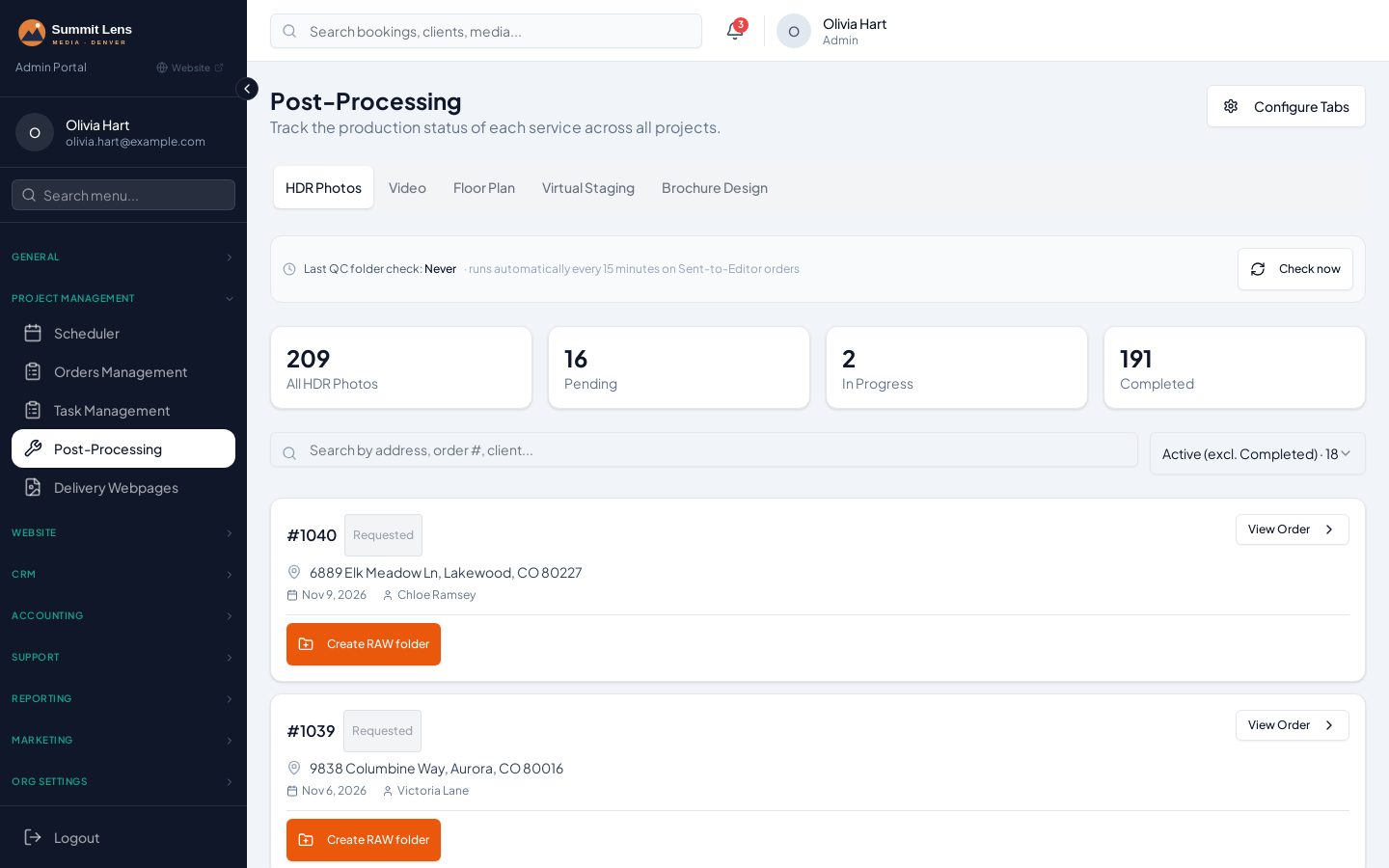
- The post-production hub checks the job's Dropbox QC folder every 15 minutes. When edits arrive, the service moves to QC Review, notifications go out, and full-size and MLS-size downloads are generated.
- Approved files go out on a branded delivery page, and reports show contractor and editor volume, pay and turnaround.
Plans start at $99 a month with unlimited orders, or $8.99 per delivered listing with no monthly fee. See pricing for what each plan includes.
Editing workflow checklist
- One folder per order, named with the order number, created at booking
- Fixed subfolders: RAW, QC, Final, MLS, plus one per extra service
- File names that include the order number
- A written brief with services, photo count, deadline, attention items and links
- Outside editors see only the jobs sent to them and return files to one place
- Automatic follow-up when a job is not accepted or delivered on time
- A QC check on every order before files reach the agent
- Revisions saved as new files, never over the approved set
- Turnaround tracked per editor, from upload to QC to approval